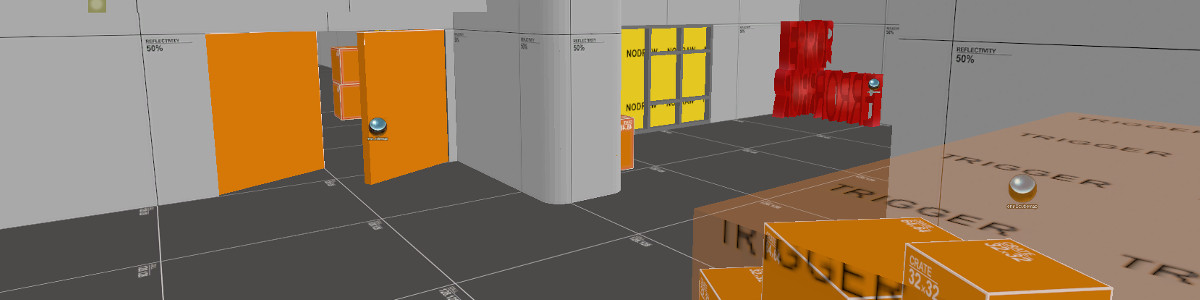
Making a low gravity area.

Credits

Submitter
  • P2: Drudge
    Points: 2,987
  • C2: Ripe Member
  • A5: Veteran
    Account Age: 5 years
josh3h
(Creator/Co-creator)
Key Authors
th3hidd3n

Rating

10.0/10
Based off 1 rating(s)

Additional Info

Genre
Other/Misc
Difficulty Level
Intermediate

Stats

Post Count
11
ViewCount
3,221
Date Added
4 years ago
Date Modified
7 months ago

This tutorial will teach you how to create an area of your map have lower gravity than the rest of your map.

1- Firstly move to the doorway (entrance) of your room that you want to have low gravity screen1

2- Then Create two blocks with the trigger texture the hight of your doorway and half the width of your doorway. screen2

3- Next place the two trigger textured blocks into the doorway. screen3

4- Select the block that if your player walks into this room he will wal through this one first screen4

5- press ctrl+t to tie this block to an entity, tie this to trigger_gravity. Then leave all the properties the same on this block.

6- After that tie the block that your player will walk through last to trigger_gravity aswell. You need to change one of the properties for this and its the bottom one the (gravity 1-0) 1 is default gravity so change the number to fit your liking try 0.5.

well thats about it test your map and adjust it untill you like it. If you have any preoblems just contact me.

  • You must be a member

Comments

    • C1: Member
    • A5: Veteran
      Account Age: 5 years

    I got same problem like Cezaris LT . my normal area is good with lag but if i go in the low gravity area its like i lag :s

    Bananite
    • P1: Beggar
      Points: 799
    • E1: Helper
      EF: 4
    • C1: Member
    • A5: Veteran
      Account Age: 4 years

    What if you wanted a whole map low gravity? Would the same apply except you just cover the whole map in the trigger_gravity?

    *BOOM* Headshot
    • P1: Beggar
      Points: 120
    • C1: Member
    • A5: Veteran
      Account Age: 5 years

    Lol re post a better version lol one of the steps i think 3 is confusing you like select he block your player wil wal through and im confused by it XD

    Bananite Fun Sun Protection
    • P1: Beggar
      Points: 998
    • C1: Member
    • A5: Veteran
      Account Age: 5 years

    Why Is It All F**k Up When i Do This ? when I Jump Is Not Nice It All Like LAG Or Someting why ??????

    [I HAve 512 Mb Geforce ] [1 Gb Of Ram]

    Is There Any Way To Sed It Sow It EXACLY Like sv_gravity 200 ??? Come On i Know It Posible ! ! !

    Thank You !

    Mapping In HD
    • P2: Drudge
      Points: 2,987
    • C2: Ripe Member
    • A5: Veteran
      Account Age: 5 years
    josh3h

    Omg dude if i didnt test it i wouldnt add it would i ...

    a.k.a unique
    • P4: Worker
      Points: 37,669
    • E1: Helper
      EF: 12
    • C1: Member
    • A5: Veteran
      Account Age: 5 years

    Pros: This works...see cons Cons: This works for the entire map and does not get reset and the end of the round. Improvements: A version with gravity just for the one room. Not the whole map. Notes: Test stuff first.

    <3 <3 <3
    • P2: Drudge
      Points: 2,987
    • C2: Ripe Member
    • A5: Veteran
      Account Age: 5 years
    josh3h

    XD

    a.k.a unique
    • P2: Drudge
      Points: 2,489
    • C1: Member
    • A5: Veteran
      Account Age: 5 years

    Cool stuff! I didn't know you could do that. Well, I learnt something today!

    Real men use Scouts.
    • P2: Drudge
      Points: 5,177
    • E1: Helper
      EF: 2
    • C1: Member
    • A5: Veteran
      Account Age: 5 years

    Wow really nice job Hidden, keep up.

    electronic girl!
    • P1: Beggar
      Points: 273
    • C1: Member
    • A5: Veteran
      Account Age: 6 years

    Good tutorial, remember to have a non-trigger gravity area, you don't need to complete the name field of the entity. I made this error some time ago as the func_train entity. Good job th3hidd3n.

    ex-mapper
  • You must be a member