More Realistic Snow

Credits

Submitter
  • P2: Drudge
    Points: 1,377
  • E1: Helper
    EF: 4
  • C1: Member
  • A5: Veteran
    Account Age: 6 years
Demolitions (Creator/Co-creator)
Key Authors
Demolitions

Rating

9.3/10
Based off 3 rating(s)

Additional Info

Genre
Mapping
Difficulty Level
Intermediate

Stats

Post Count
13
ViewCount
3,228
Date Added
4 years ago
Date Modified
6 months ago

In this quick tutorial, I’ll show you how to make more realistic looking, and functioning snow.

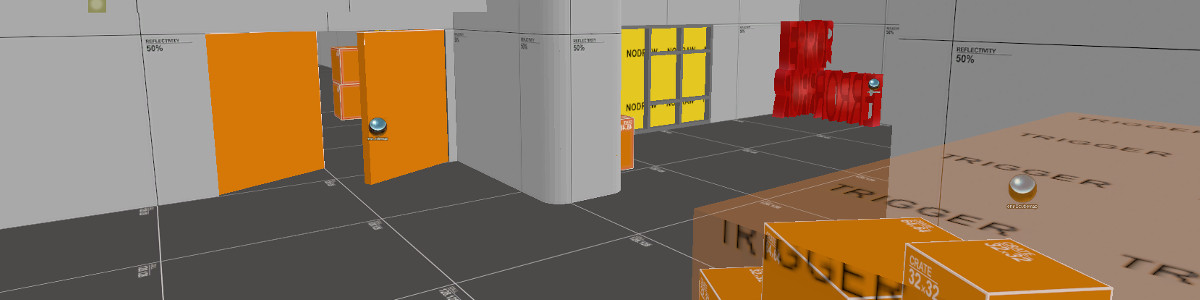
First, of course is to make your map. I made a simple little test map, which you can do too. [See image 1] Or if you already made a map that you’d like to add snow to, then go with that.

After you have made or opened your map, create a box in the area that you want snow in. Texture the whole bow with the “NODRAW” texture.

Now select it, and press ctrl + t. This should bring up tie the brush to an entity, and bring up the Object properties box. On the box under Class, scroll up, and find env_embers. The Pitch Yaw Roll should be set to 90 0 0. Ember type should be normal. Set the density to 150, particle lifetime to 8, particle speed to 64, and ember color to 255 255 255.

Then go to the FLAGS tab, just above Class. Under flags, check Start on.

Of course you can play around with these settings to get it just the way you want. And there you go. More realistic looking, and functioning snow for your frosty source maps. Look at Image 2 and 3 to see how it looks in game. Hope you found this useful.

  • You must be a member

Comments

    • P1: Beggar
      Points: 35
    • C1: Member
    • A4: Graduate
      Account Age: 4 years

    Mate great tutorial very nice snow but on your screenshots how do you get your trees to have snow on them :S ?

    Bananite
    • P2: Drudge
      Points: 1,377
    • E1: Helper
      EF: 4
    • C1: Member
    • A5: Veteran
      Account Age: 6 years

    EDIT:

    BSP example: http://files.filefront.com/snow+testbsp/;9330884;/fileinfo.html

    VMF example : http://files.filefront.com/snow+testvmf/;9330890;/fileinfo.html

    • P2: Drudge
      Points: 1,377
    • E1: Helper
      EF: 4
    • C1: Member
    • A5: Veteran
      Account Age: 6 years

    Yeah, i've got one. Let me upload it.

    • P3: Peasant
      Points: 18,736
    • C1: Member
    • A5: Veteran
      Account Age: 5 years

    Can you make a example map please?

    http://xblah.cjb.net
    • P2: Drudge
      Points: 1,377
    • E1: Helper
      EF: 4
    • C1: Member
    • A5: Veteran
      Account Age: 6 years

    I honestly have no idea. I've put too much crap into hammer to know where anything is from. Someone else asked me this, but thy found them. They might be from DOD:S.

    And the point of embers is to make it look more realistic

    • P4: Worker
      Points: 56,171
    • E2: Guide
      EF: 38
    • C1: Member
    • A5: Veteran
      Account Age: 5 years

    Env_embers could really compromize the fps of the map, func precipitation can turn to be better from this aspect. BTW, where did you find those trees?

    No it's not "tr3m3r"
    • P2: Drudge
      Points: 4,044
    • C1: Member
    • A6: Elder
      Account Age: 6 years

    Thank you!

    Everyone loves elmo!
    • P3: Peasant
      Points: 18,736
    • C1: Member
    • A5: Veteran
      Account Age: 5 years

    Looks creative. Before I try, is there any example map of this?

    http://xblah.cjb.net
    • P2: Drudge
      Points: 6,780
    • E3: Tutor
      EF: 63
    • C1: Member
    • A5: Veteran
      Account Age: 5 years

    Hmm I will try this out when I make a snow map.

    Mapping Imp
    • P2: Drudge
      Points: 1,312
    • E2: Guide
      EF: 36
    • C1: Member
    • A5: Veteran
      Account Age: 5 years

    White embers? clever... who woulda thunk.

    Transcendence into the Periphe
  • You must be a member